BaseRock Agent Usage
As explained in the BaseRock Agent Introduction above, in a nutshell, BaseRock agent essentially allows BaseRock control-plane to communicate with the developer’s system or machine on which test execution takes place (physical or virtual).
There are 3 primary usages of BaseRock agent:
- To execute single test cases via UI
- To execute bunch of test cases either by manual trigger or CICD pipeline
- Create service on BaseRock from locally available source code if not via git connector
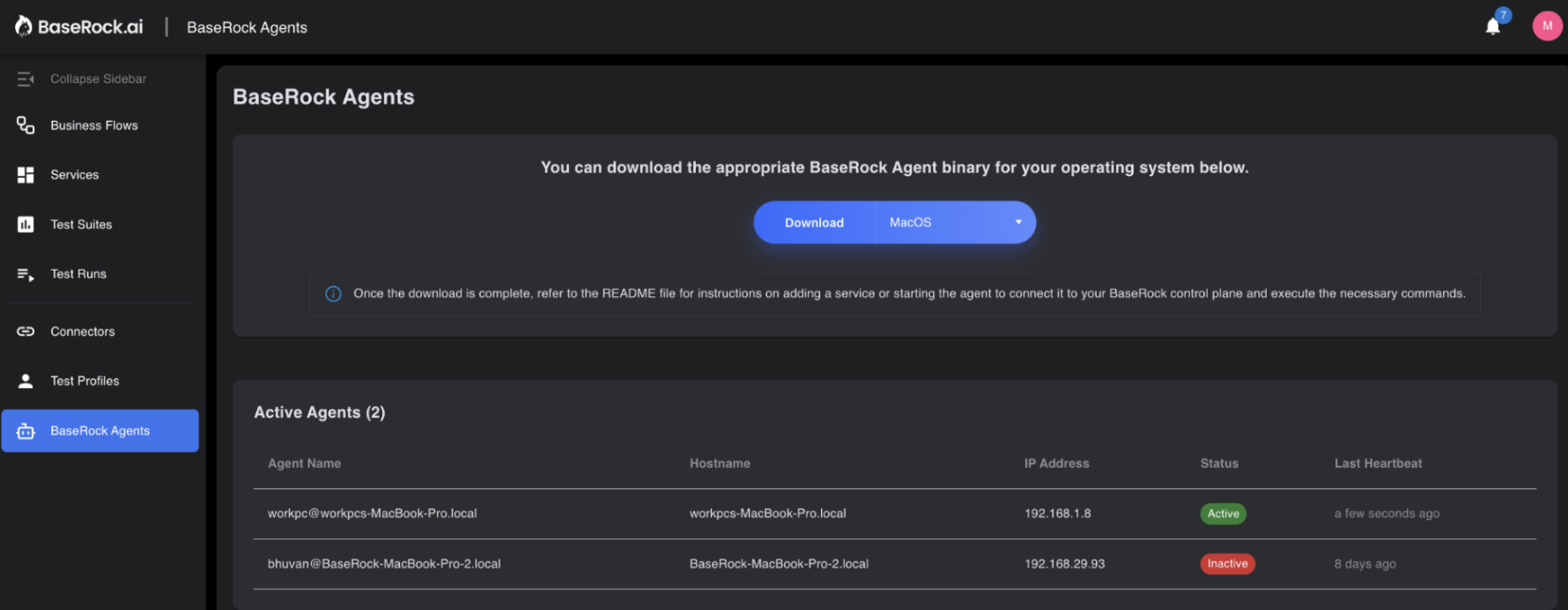
BaseRock agent can be downloaded from the UI from the left panel. Once done make sure that the env is set (run set_env.sh) and the agent is whitelisted (run startup.sh)
Execute single test case:
BaseRock allows users to run a single test case right from the UI. Every test case has a “run” button in front of it.
The only condition is that the BaseRock agent should be already running and be in Active status as shown above. To activate the agent, run the file start_baserock_daemon.sh from the baserock_agent folder that you’ve downloaded.
Execute test suite:
To run multiple tests, first configure the suite file (run_tests.sh) inside the BaseRock agent folder, then execute it.
The configuration options are:
./baserock_agent --run-tests \
--service="service_ABC" \
--env="staging123" \
--service-url="https://app.dev.yourCompany.com/" \
--protocol="rest,graphql,kafka" \
--test-case-id="TC-1,TC-2" \
--tags="regression"\
--category="HAPPY_TEST_CASES or NEGATIVE_TEST_CASES" \
--endpoints="/user/auth,/temp/job,/user/jobs" \
--version="2025.12.11.978" \
--method="GET,POST,PUT,DELETE,PATCH"
Where, - Service is the name of the service inside baserock in which the test cases are present (Mandatory). - Env is a string to organize tests by environment (e.g., staging or pre-prod) (Mandatory). - Service-url is the base url of the endpoints of your application (Mandatory). - Protocol is the type of endpoint like REST or Kafka or graphQL (Mandatory). - Test case ID is used when you want to include specific test cases in this suite - Tags are the string literals you have tagged a test case with - Category is the type of test case that BaseRock has generated - Endpoints lets you organize the suite by endpoint - Version is your service version - Methods are your API methods
For multiple values, use double-quoted, comma-separated values as shown above.
Add service via git:
This option allows users to add a specific version of a service on BaseRock directly from the local machine without first pushing to the cloud repository.
Run the file add_service.sh after configuring the following inside this file.
./baserock_agent --add-service \
--service=<service-name> \
--tech-stack=<tech-stack> \
--integration-type=<Integration-type> \
--local-src-path=<local-src-path>
Here, - Service is the name of the service you want to store it as and it will reflect on BaseRock UI - Tech stack is your microservice programming language. You can specify Java, Python, GoLang, JavaScript, etc. - Integration type is optional. It provides additional information about the tech stack (e.g., Spring Boot for Java, Django for Python, Kafka). - Local src path is the path where your source code is saved on your local system. BaseRock will learn from it and discover endpoints, which will then appear in the BaseRock UI once discovery is complete.
Detailed Sample Examples:
You can either use the command line directly or use run_tests.sh to create multiple .sh files with different configurations for different needs, then run them via terminal or CI pipeline.
For example, if you have a few login test cases that must run before every release, make a copy of run_tests.sh, rename it to something like login_smoke_suite.sh, and use the following configuration for your smoke suite:
./baserock_agent --run-tests \
--service="login" \
--env="dev" \
--service-url="https://app.dev.yourCompany.com/" \
--protocol="rest" \
--tags="smoke"
Below are some more examples of other configurations with a petstore scenario
1. Run All test cases
Prerequisites:
- User has access to the BaseRock control plane (By default it’s https://app.baserock.ai)
- The user has already onboarded a service named as “petstore-backend” resulting in discovery of many endpoints.
- The user has generated and reviewed playbooks for the endpoints that entail setup, test and teardown steps.
- The user has already generated and reviewed test suites for some of the endpoints.
- The user has an instance of the petstore-backend service already running successfully at https://qa.example.app/petstore-backend URL.
- service is hosted at http://localhost:8080.
Command Line:
./baserock_agent --run-tests \
--service=petstore-backend \
--env=QA \
--service-url=https://qa.example.app/petstore-backend
2. Run All positive test cases
Prerequisites:
- User has access to the BaseRock control plane (By default it’s https://app.baserock.ai)
- The user has already onboarded a service named as “petstore-backend” resulting in discovery of many endpoints.
- The user has generated and reviewed playbooks for the endpoints that entail setup, test and teardown steps.
- The user has already generated and reviewed test cases for some of the endpoints.
- The user has an instance of the petstore-backend service already running successfully at https://qa.example.app/petstore-backend URL.
- service is hosted at http://localhost:8080
Command Line:
./baserock_agent --run-tests \
--service=petstore-backend \
--env=QA \
--service-url=http://localhost:8080 \
--category=HAPPY_TEST_CASE
Note
category is specified as an additional filter
3. Run test cases of specific set of endpoints
Prerequisites:
- The user has access to the BaseRock control plane (By default it’s https://app.baserock.ai)
- The user has already onboarded a service named as “petstore-backend” resulting in discovery of many endpoints.
- The user has generated and reviewed playbooks for the endpoints that entail setup, test and teardown steps.
- The user has already generated and reviewed test cases for /inventory and /owners endpoints.
- The user has an instance of the petstore-backend service already running locally at http://localhost:8080 URL.
Command Line:
./baserock_agent --run-tests \
--service=petstore-backend \
--env=QA \
--service-url=http://localhost:8080 \
--endpoint=/inventory,/owner
Note
endpoint addresses are specified as an additional filter with comma delimiter.
4. Run test cases of specific method of a specific endpoint
Prerequisites:
- User has access to the BaseRock control plane (By default it’s https://app.baserock.ai)
- The user has already onboarded a service named as “petstore-backend” resulting in discovery of many endpoints.
- The user has generated and reviewed playbooks for the endpoints that entail setup, test and teardown steps.
- The user has already generated and reviewed test suites for POST /inventory endpoint.
- The user has an instance of the petstore-backend service already running locally at http://localhost:8080 URL.
Command Line:
./baserock_agent --run-tests \
--service=petstore-backend \
--env=QA \
--service-url=http://localhost:8080 \
--endpoint=/inventory \
--method=POST
Note
endpoint addresses and method are specified as additional filters.