BaseRock Agent Usage
As explained in the BaseRock Agent Introduction above, in a nutshell, the BaseRock agent allows the BaseRock control plane to communicate with the developer’s system or machine on which test execution takes place (physical or virtual).
There are 3 primary usages of BaseRock agent:
- To execute test cases
- To execute use cases
- To onboard a service to BaseRock from local via CLI (if not using a git connector)
- To add a new version of existing service
The BaseRock agent can be downloaded from the UI from the left panel. Once done, make sure that the env is set (run set_env.sh) and the agent is whitelisted (run startup.sh).
Start BaseRock agent in Daemon mode
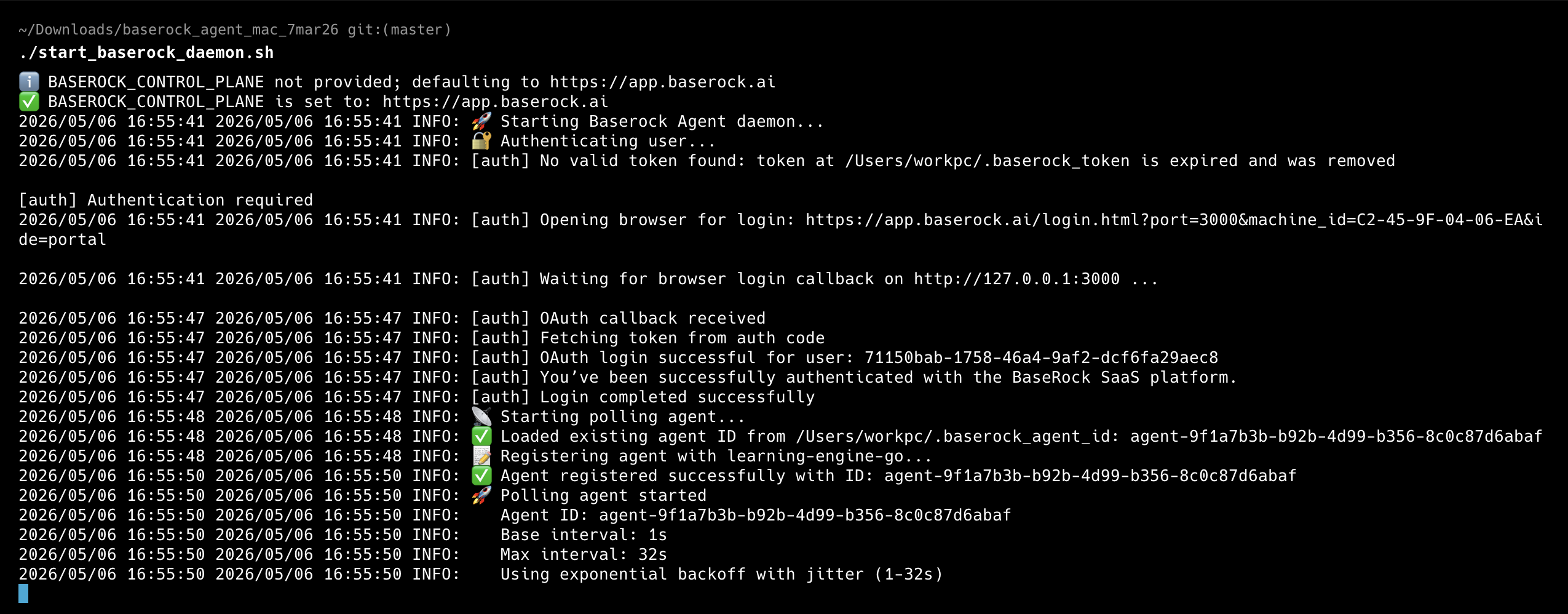
Running the BaseRock agent in daemon mode keeps it alive as a persistent background process, continuously connected to the BaseRock control plane. It authenticates your machine, registers itself with a unique agent ID, and polls for incoming commands using exponential backoff (1–32s).
This enables the Run from UI feature — when you click the run button on a test case in the BaseRock webapp, the control plane dispatches the job to your agent, which executes it locally. Without the daemon running, the webapp has no channel to reach your environment.
To start it, run the following from your downloaded agent folder:
./start_baserock_daemon.sh
On first run (or after token expiry), a browser window will open for OAuth login. Once authenticated (same way as shown here ), the agent registers itself and starts polling — you'll see a confirmation with your assigned Agent ID. Keep this terminal session open, or run it in a background process manager so the agent stays active.
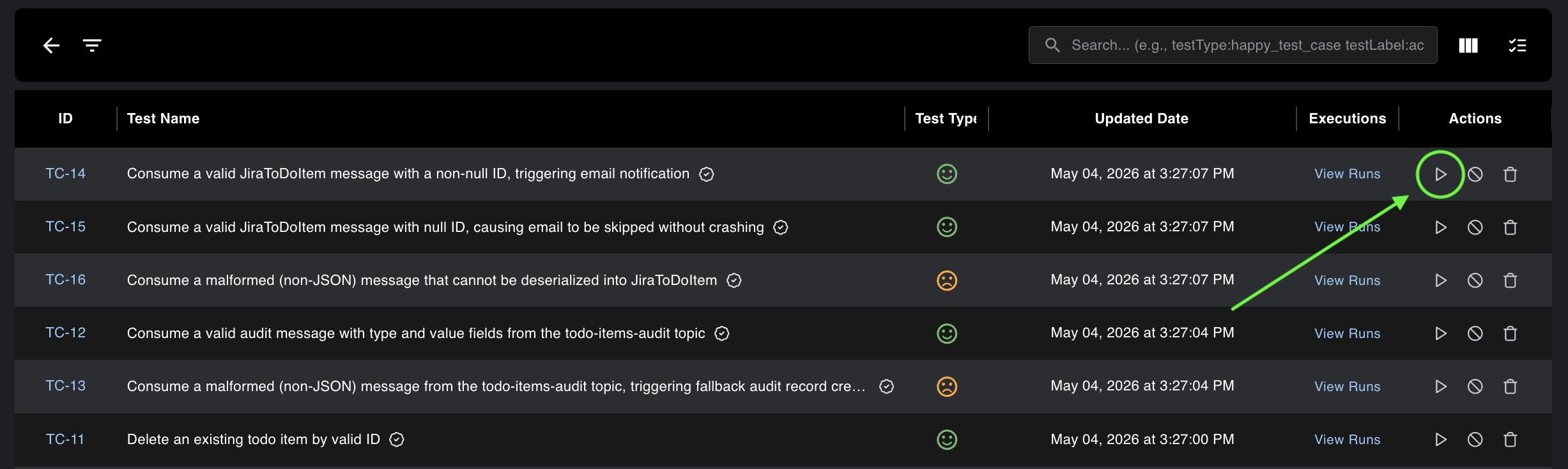
Execute a single test case:
BaseRock allows users to run test cases right from the UI. Every test case has a “run” button in front of it.
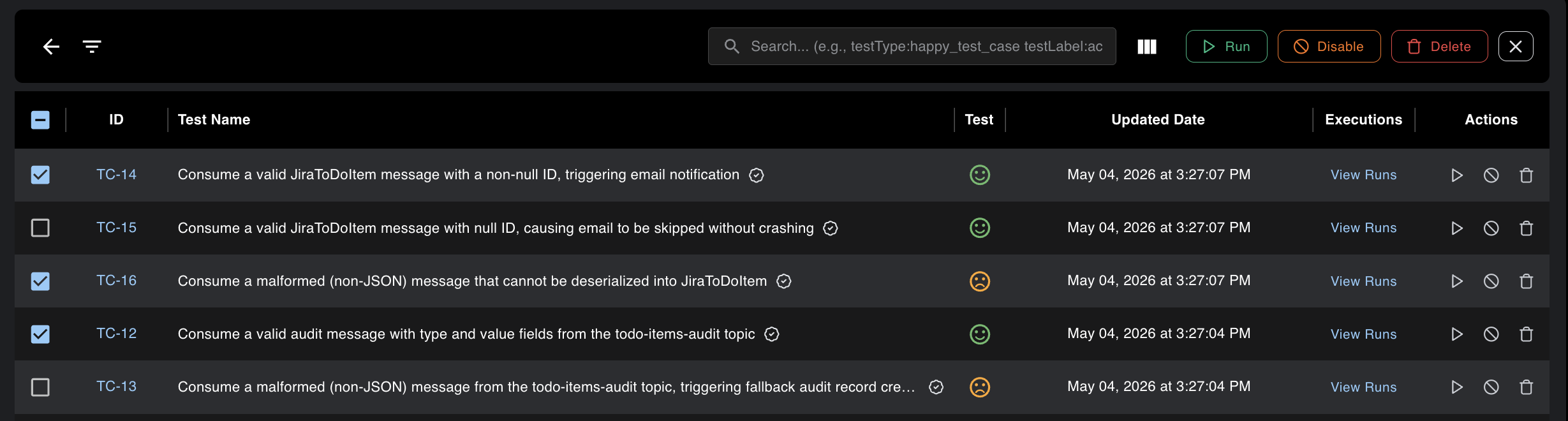
Execute multiple test cases:
For executing multiple test cases via UI, user can click on "bulk Operation" from top right corner and then select the test cases manually to execute them as shown in the screen below.
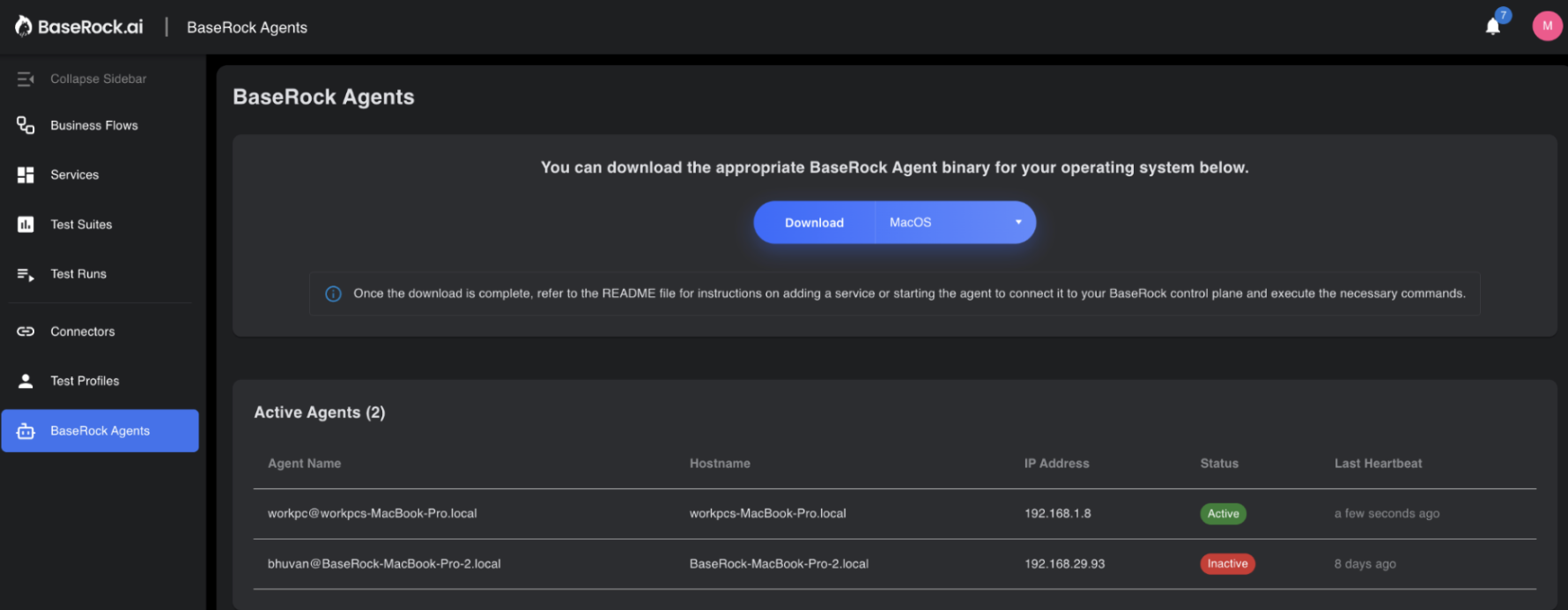
The only condition is that the BaseRock agent should be already running and be in Active status as shown below.
Execute test suite:
To run multiple tests via CI/CD or CLI, first configure the suite file (run_tests.sh) inside the BaseRock agent folder, then execute it.
This suite file is essentially a way to ensure you create a set of test cases that need to be executed together everytime.
For example: smoke tests, regression tests, etc.
The configuration options are:
./baserock_agent --run-tests \
--service="service_ABC" \
--env="staging123" \
--service-url="https://app.dev.yourCompany.com/" \
--protocol="rest,graphql,kafka" \
--test-case-id="TC-1,TC-2" \
--tags="regression"\
--category="HAPPY_TEST_CASES or NEGATIVE_TEST_CASES" \
--endpoints="/user/auth,/temp/job,/user/jobs" \
--version="2025.12.11.978" \
--method="GET,POST,PUT,DELETE,PATCH"
Where, - Service is the name of the service inside baserock in which the test cases are present (Mandatory). - Env is a string to organize tests by environment (e.g., staging or pre-prod) (Mandatory). - Service-url is the base url of the endpoints of your application (Mandatory). - Protocol is the type of endpoint like REST or Kafka or graphQL (Mandatory). - Test case ID is used when you want to include specific test cases in this suite - Tags are the string literals you have tagged a test case with - Category is the type of test case that BaseRock has generated - Endpoints lets you organize the suite by endpoint - Version is your service version - Methods are your API methods
For multiple values, use double-quoted, comma-separated values as shown above.
Execute use cases
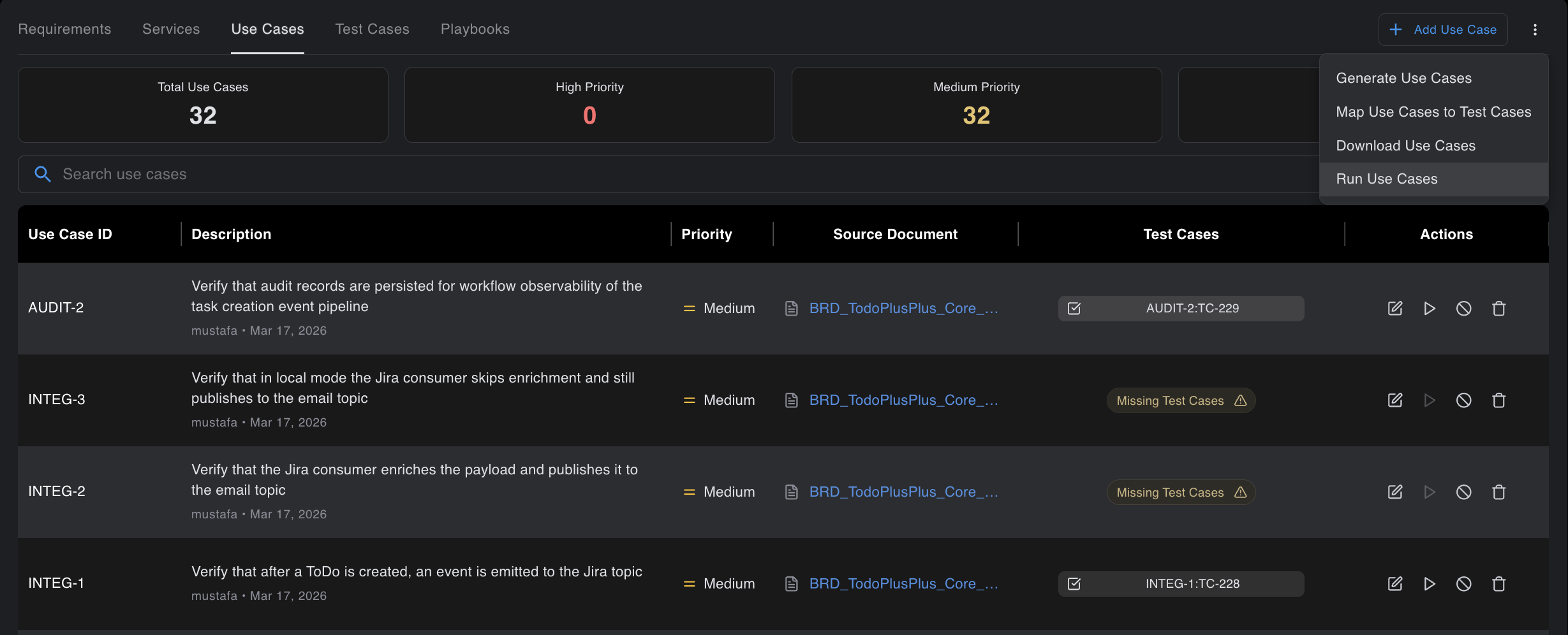
Executing use cases is only via UI where a user can navigate to the Business Flows section of BaseRock and under the Use Cases tab they should see individual run button corresponding to individual uses cases or a Run Use Cases button from the top kebab menu where they can select multiple use cases together and execute them as shown in the screen below.
Onboard service from local source code:
This option allows users to add a specific version of a service on BaseRock directly from the local machine without first pushing to the cloud repository.
Run the file add_service.sh after configuring the following inside this file.
./baserock_agent --add-service \
--service=<service-name> \
--tech-stack=<tech-stack> \
--integration-type=<Integration-type> \
--local-src-path=<local-src-path>
Here, - Service is the name of the service you want to store it as and it will reflect on BaseRock UI - Tech stack is your microservice programming language. You can specify Java, Python, GoLang, JavaScript, etc. - Integration type is optional. It provides additional information about the tech stack (e.g., Spring Boot for Java, Django for Python, Kafka). - Local src path is the path where your source code is saved on your local system. BaseRock will learn from it and discover endpoints, which will then appear in the BaseRock UI once discovery is complete.
Detailed Sample Examples:
You can either use the command line directly or use run_tests.sh to create multiple .sh files with different configurations for different needs, then run them via terminal or CI pipeline.
For example, if you have a few login test cases that must run before every release, make a copy of run_tests.sh, rename it to something like login_smoke_suite.sh, and use the following configuration for your smoke suite:
./baserock_agent --run-tests \
--service="login" \
--env="dev" \
--service-url="https://app.dev.yourCompany.com/" \
--protocol="rest" \
--tags="smoke"
Below are some more examples of other configurations with a petstore scenario
1. Run All test cases
Prerequisites:
- User has access to the BaseRock control plane (By default it’s https://app.baserock.ai)
- The user has already onboarded a service named as “petstore-backend” resulting in discovery of many endpoints.
- The user has generated and reviewed playbooks for the endpoints that entail setup, test and teardown steps.
- The user has already generated and reviewed test suites for some of the endpoints.
- The user has an instance of the petstore-backend service already running successfully at https://qa.example.app/petstore-backend URL.
- service is hosted at http://localhost:8080.
Command Line:
./baserock_agent --run-tests \
--service=petstore-backend \
--env=QA \
--service-url=https://qa.example.app/petstore-backend
2. Run All positive test cases
Prerequisites:
- User has access to the BaseRock control plane (By default it’s https://app.baserock.ai)
- The user has already onboarded a service named as “petstore-backend” resulting in discovery of many endpoints.
- The user has generated and reviewed playbooks for the endpoints that entail setup, test and teardown steps.
- The user has already generated and reviewed test cases for some of the endpoints.
- The user has an instance of the petstore-backend service already running successfully at https://qa.example.app/petstore-backend URL.
- service is hosted at http://localhost:8080
Command Line:
./baserock_agent --run-tests \
--service=petstore-backend \
--env=QA \
--service-url=http://localhost:8080 \
--category=HAPPY_TEST_CASE
Note
category is specified as an additional filter
3. Run test cases of specific set of endpoints
Prerequisites:
- The user has access to the BaseRock control plane (By default it’s https://app.baserock.ai)
- The user has already onboarded a service named as “petstore-backend” resulting in discovery of many endpoints.
- The user has generated and reviewed playbooks for the endpoints that entail setup, test and teardown steps.
- The user has already generated and reviewed test cases for /inventory and /owners endpoints.
- The user has an instance of the petstore-backend service already running locally at http://localhost:8080 URL.
Command Line:
./baserock_agent --run-tests \
--service=petstore-backend \
--env=QA \
--service-url=http://localhost:8080 \
--endpoint=/inventory,/owner
Note
endpoint addresses are specified as an additional filter with comma delimiter.
4. Run test cases of specific method of a specific endpoint
Prerequisites:
- User has access to the BaseRock control plane (By default it’s https://app.baserock.ai)
- The user has already onboarded a service named as “petstore-backend” resulting in discovery of many endpoints.
- The user has generated and reviewed playbooks for the endpoints that entail setup, test and teardown steps.
- The user has already generated and reviewed test cases for some of the endpoints.
- The user has an instance of the petstore-backend service already running locally at http://localhost:8080 URL.
Command Line:
./baserock_agent --run-tests \
--service=petstore-backend \
--env=QA \
--service-url=http://localhost:8080 \
--endpoint=/inventory \
--method=POST
Note
endpoint addresses and method are specified as additional filters.