Playbooks - A Deep Dive
Overview
A Playbook is a form of program written in NLP - in english. You just describe the test behavior in simple english and the system handles execution.
In other words, it is a structured set of instructions that are written in plain English and processed by the AI engine, which converts them into executable test steps automatically.
This is how playbooks look like:

Playbook Structure
Every playbook consists of three sequential phases:
| Phase | Description |
|---|---|
| Setup | Actions performed before the endpoint is called. Used to prepare state, authenticate, or create prerequisite data. |
| Execution | The actual API call to the endpoint under test, including request payload and expected response validation. |
| Teardown | Cleanup actions performed after the test completes. Used to remove data created during setup or execution. |
flowchart LR
    A["📋 Setup\nPrepare state\nbefore the test"]
    B["▶️ Execution\nCall the endpoint\nvalidate response"]
    C["🧹 Teardown\nClean up\nafter the test"]
    A --> B --> C
    style A fill:#4A90D9,color:#fff,stroke:#2c6fad
    style B fill:#7B68EE,color:#fff,stroke:#5a4dbf
    style C fill:#48C774,color:#fff,stroke:#2ea35e
Playbook Levels
Playbooks exist at four levels. Each level corresponds to a different scope of testing.
graph TD
    A["🏢 Service-Level Playbook\nScope: Entire service\nHandles shared state across all endpoints"]
    B["🔌 Endpoint-Level Playbook\nScope: One API endpoint\nDefines general test behavior for that endpoint"]
    C1["🧪 Test Case Playbook\nScope: One test scenario\nAdapted from the endpoint playbook with specific inputs"]
    C2["🧪 Test Case Playbook\nScope: Another test scenario"]
    D["🔄 Business Flow Playbook\nScope: Multi-step user journey\nChains multiple endpoints in sequence"]
    A --> B
    B --> C1
    B --> C2
    A --> D
    style A fill:#4A90D9,color:#fff,stroke:#2c6fad
    style B fill:#7B68EE,color:#fff,stroke:#5a4dbf
    style C1 fill:#48C774,color:#fff,stroke:#2ea35e
    style C2 fill:#48C774,color:#fff,stroke:#2ea35e
    style D fill:#FF8C42,color:#fff,stroke:#d96e25
Service-Level Playbook
Scope: Entire service
Contains setup and teardown steps that apply globally across all endpoints in a service. Commonly used to manage shared dependencies such as authentication tokens, environment variables, or globally scoped test data.
Service-level playbooks run before any endpoint-level test execution begins and are shared across all endpoints in the service.
Context Variables:
There is another notion in BaseRock called as Context Variables which is right above the service level playbook prompt area.
Context variables are sort of a storage buckets that can be either pre-filled during configurations with a static data or can be dynamically initialised based on the behaviour of test execution.
They can be used to performing run-time computations or providing actions or test data via playbook for the execution.
Types of variables:
1. Text - Simple string like information. Ex: email address, employee ID, etc
2. Encrypted text - To store passwords and sensitive data
3. Object(JSON) - To store JSON payloads of API. Ex: various payloads to be passed to an API for different tests
4. File - To upload and store files like .pdf, .jpeg, ,txt, .csv, .xls for passing an entire document into an API
5. List - If one has to pass multiple variables of same type (Text, Encrypted text, JSON object, File) but as a single group then the users can use List.
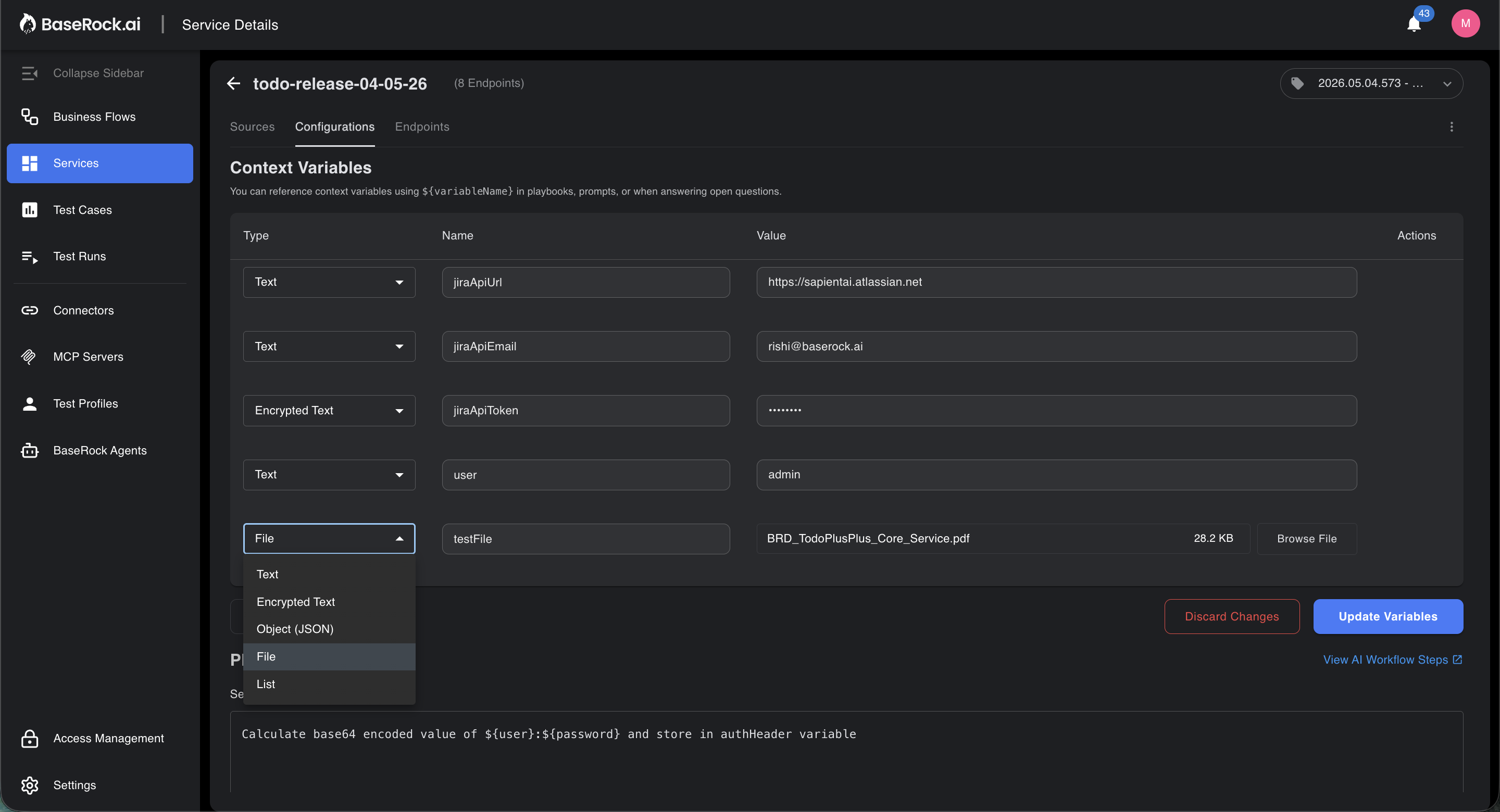
To refer a variable inside playbook text area use the syntax:
${variableName}
Endpoint-Level Playbook
Scope: A single API endpoint (e.g., POST /orders)
Defines the general test behavior for one endpoint. This is not tied to any specific test case — it describes how the endpoint should be tested in principle.
An endpoint can have multiple playbooks, each covering a different test category:
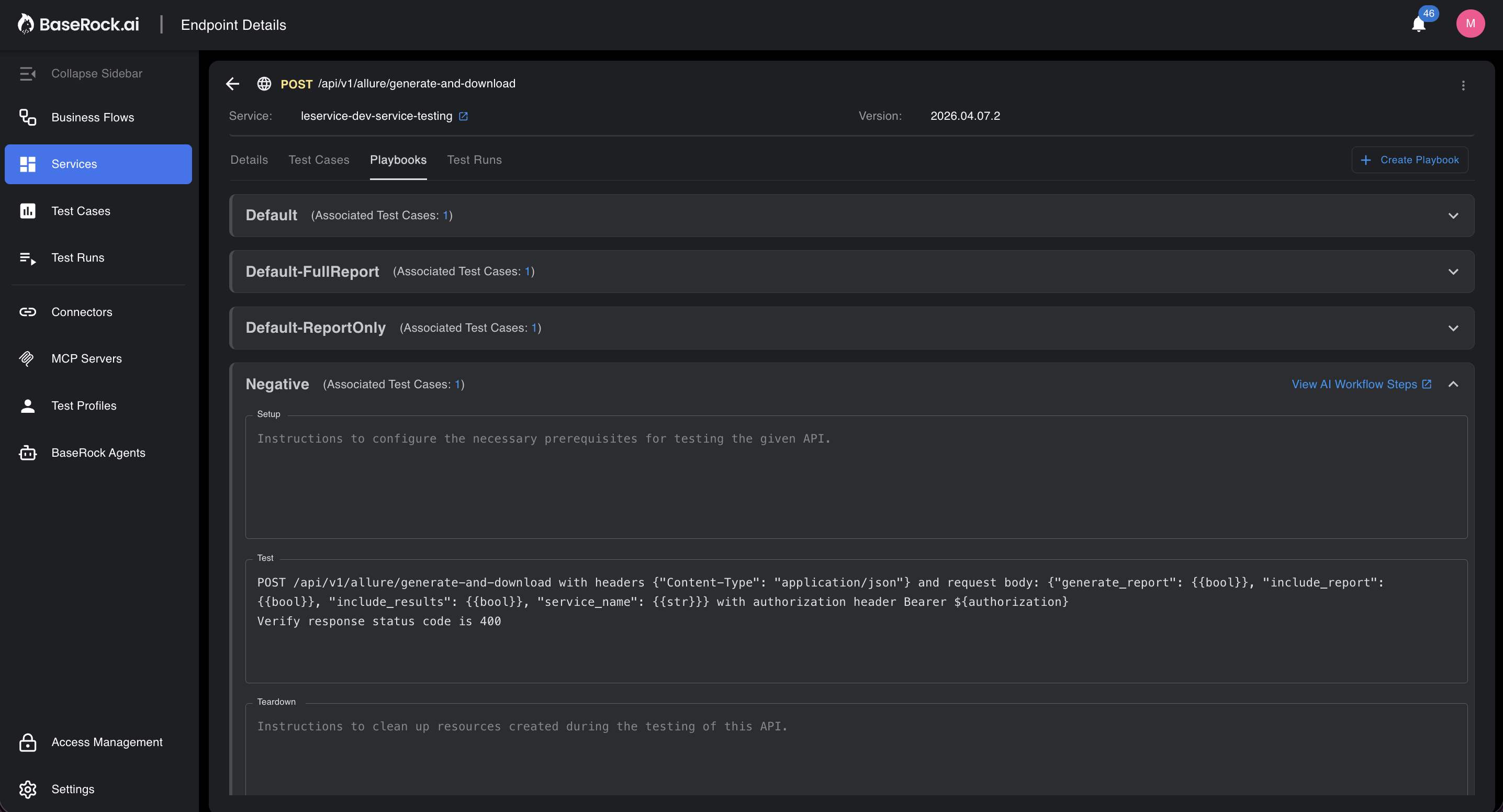
| Playbook Name | Purpose |
|---|---|
Default |
Covers the expected successful path (happy path) |
Negative |
Covers invalid inputs and error responses |
Edge Case |
Covers boundary conditions and atypical inputs |
Each (service, endpoint, playbook_name) combination is unique.
Test Case Playbook
Scope: A single test scenario under an endpoint
Generated by adapting an endpoint-level playbook to a specific test case. The AI fills in concrete values — exact request payloads, expected status codes, and response assertions — based on the test case definition.
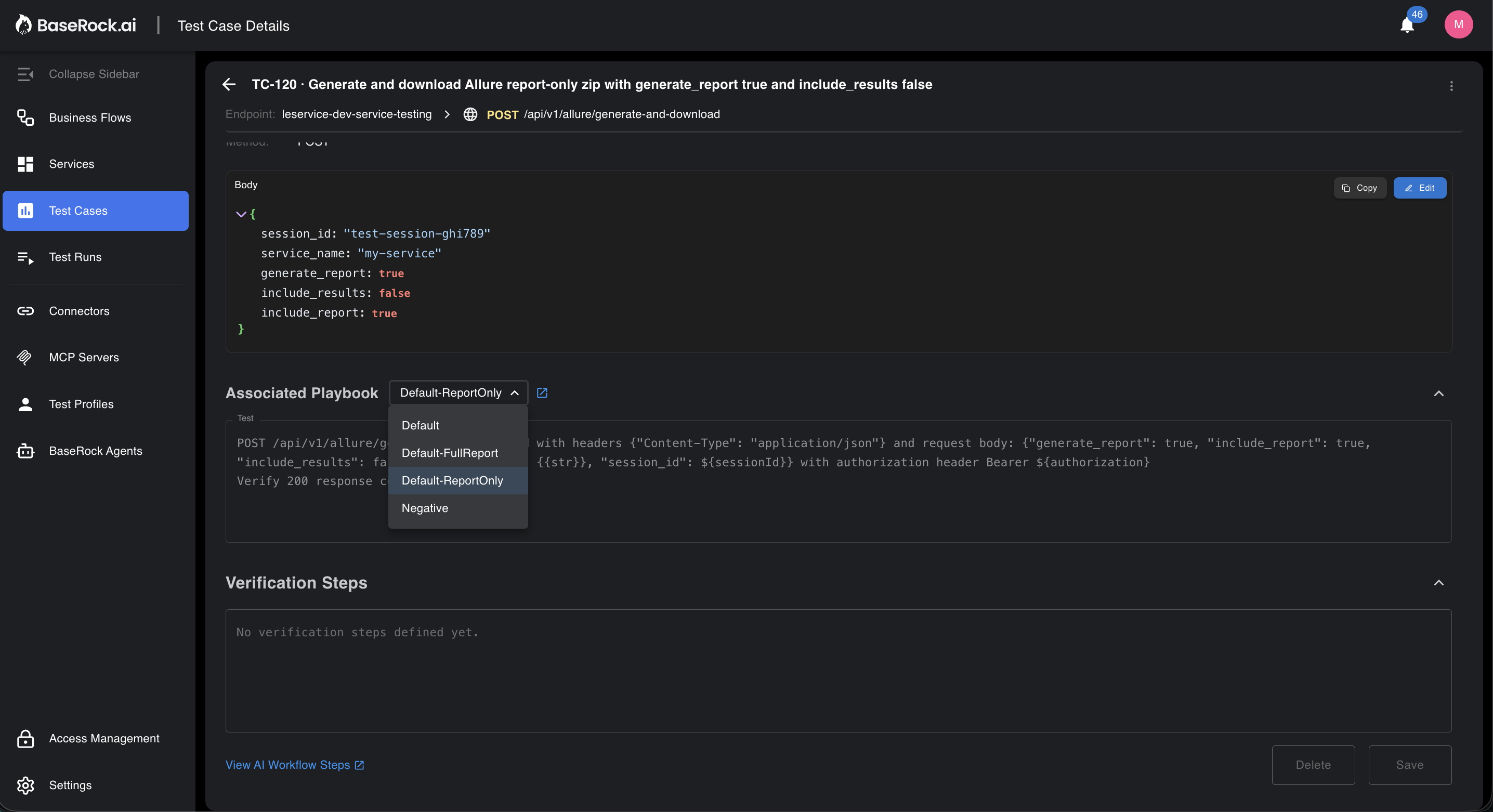
Test case playbooks are not named. They are linked to a specific test_case_id and reference the endpoint playbook they were derived from.
Business Flow Playbook
Scope: A sequence of API calls representing a user journey
Chains multiple endpoints into an ordered execution flow. The response data from one step can be passed as input to the next step (e.g., an order_id returned from POST /orders is used in GET /orders/{order_id}).
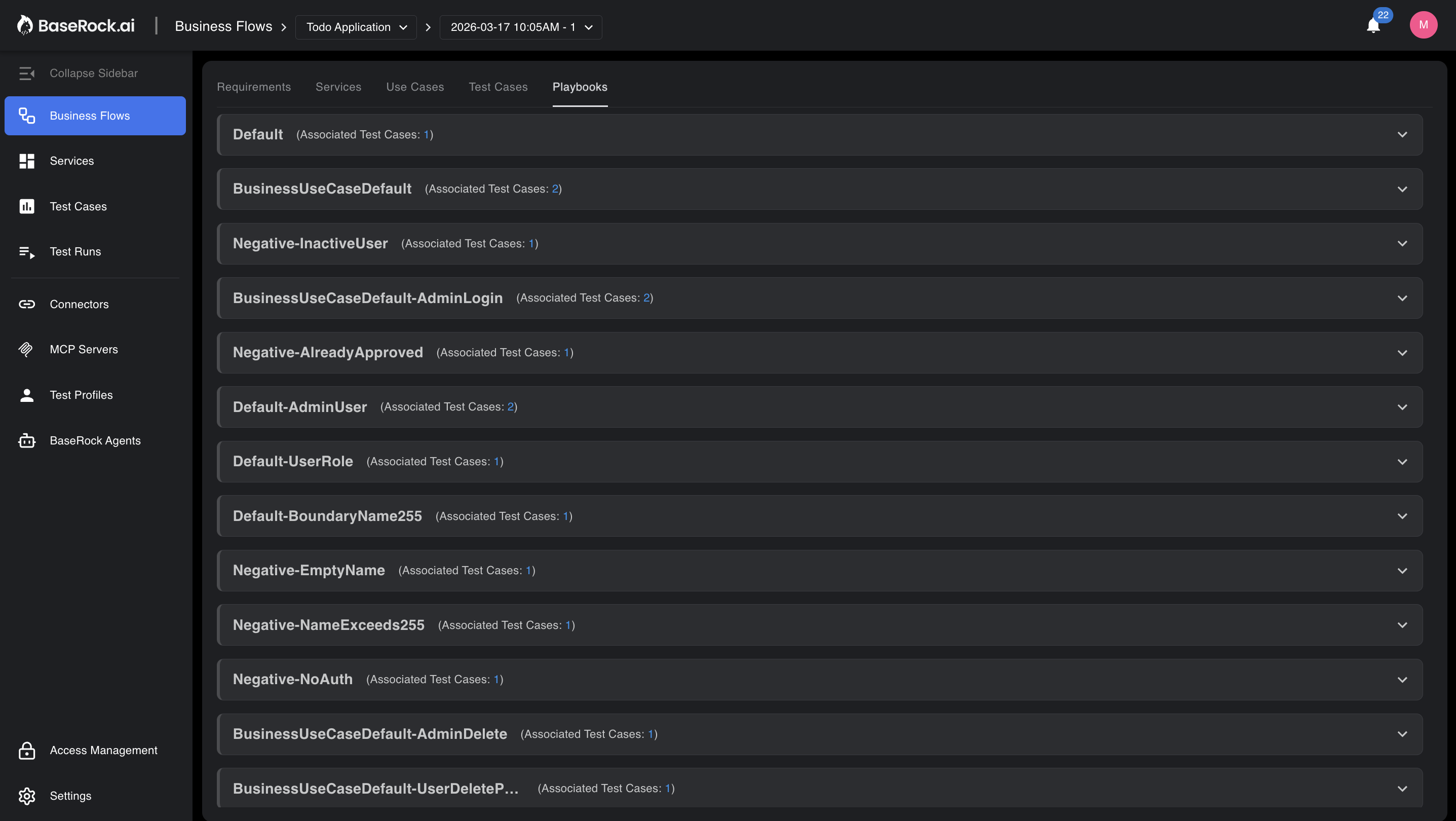
Used for end-to-end testing of business processes that span multiple endpoints.
Relationship Between Levels
flowchart LR
    subgraph SVC["🏢 Service"]
        SP["Service Playbook\n(auth, shared tokens)"]
    end
    subgraph EP["🔌 Endpoint: POST /orders"]
        EPB1["Endpoint Playbook\nDefault"]
        EPB2["Endpoint Playbook\nNegative"]
    end
    subgraph TC["🧪 Test Cases"]
        TC1["Test Case Playbook\n'Valid order creation'"]
        TC2["Test Case Playbook\n'Order with missing field'"]
        TC3["Test Case Playbook\n'Duplicate order'"]
    end
    subgraph BF["🔄 Business Flow"]
        BFP["Flow Playbook\nLogin → Browse → Order → Pay"]
    end
    SP --> EPB1
    SP --> EPB2
    SP --> BFP
    EPB1 --> TC1
    EPB2 --> TC2
    EPB2 --> TC3
    style SP fill:#4A90D9,color:#fff
    style EPB1 fill:#7B68EE,color:#fff
    style EPB2 fill:#7B68EE,color:#fff
    style TC1 fill:#48C774,color:#fff
    style TC2 fill:#48C774,color:#fff
    style TC3 fill:#48C774,color:#fff
    style BFP fill:#FF8C42,color:#fff
Playbook Lifecycle
sequenceDiagram
    participant U as User
    participant AI as AI Engine
    participant DB as Playbook Store
    participant API as Target API
    U->>AI: Define service and endpoints
    AI->>DB: Generate endpoint-level playbook
    AI->>DB: Parse instructions into structured actions
    AI->>DB: Adapt playbook for each test case
    U->>AI: Trigger test execution
    AI->>API: Run setup phase
    AI->>API: Run execution phase
    AI->>API: Run teardown phase
    AI->>U: Return test results
Playbook Status
| Status | Description |
|---|---|
PROCESSING |
Playbook is currently being generated or adapted |
READY |
Playbook is generated and available for execution |
ERROR |
An error occurred during generation or adaptation |
Reliability & Human-in-the-Loop (HITL)
A common concern with English-based prompts is the risk of misinterpretation. BaseRock eliminates this uncertainty by maintaining Human-in-the-Loop (HITL) control.
User can check the exact actionable steps inferred from the playbook English instructions by BaseRock by clicking on the link "View AI Workflow Steps"
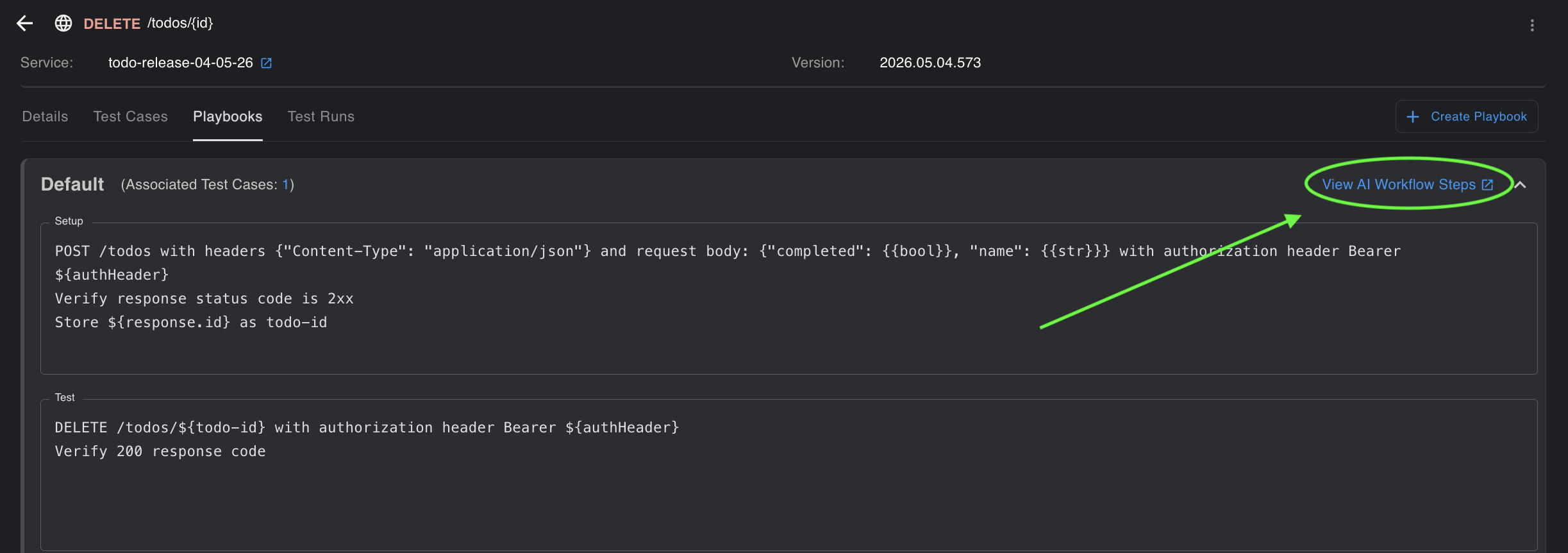
Transparent Action Mapping
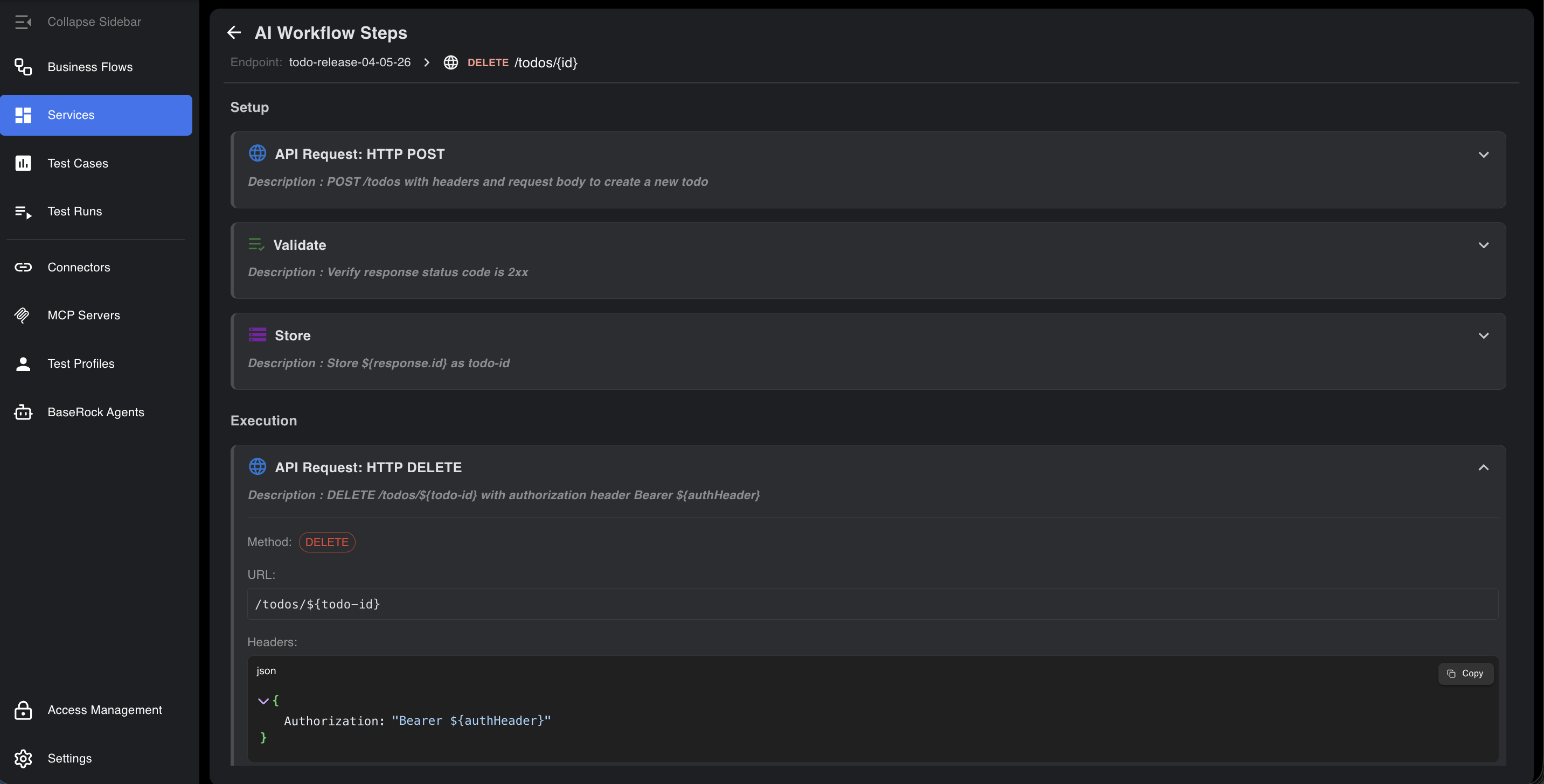
Before execution, BaseRock allows you to verify exactly what the AI intends to do:
- API Specifications: View the exact URL, headers, and payload.
- Variable Management: Track which values are being referenced or saved from responses.
- Validation Rules: Confirm specific status codes or body schemas required for success.
Full Editability
You retain final authority. If a step requires adjustment, you can refine your English prompt in the Playbook or manually edit the payload, headers, and logic directly in the workflow UI.
Note
It's always recommended to edit the playbook in english rather than making changes directly to AI workflow steps so the english steps and workflow steps are in sync. Check section: Playbook Usage to understand the best practices and some examples.